Ringtones for android phones
- 4.7
- Rating
- 10.00M
- Installs
- Free
- Price
 Analysis by App-foxy
I installed Ringtones for android phones to see whether it is genuinely useful for everyday phone alerts or simply another large sound library. My impression is that it works best as a straightforward entertainment app for people who want to replace the standard notification, call, or alarm sounds with something more personal. It is free to start, comes from Time Cable, and is aimed at Android users who prefer browsing ready-made tones instead of creating audio files themselves.
The app is not trying to be a complete phone-customization suite. Its focus is narrower: finding ringtone-style audio and choosing something that makes calls or notifications easier to recognize. That narrow purpose is also its main strength. I could approach it with a specific task in mind rather than sorting through wallpapers, themes, widgets, and unrelated customization tools. At the same time, anyone expecting advanced sound editing, deep automation, or a carefully curated music service may find the experience less satisfying.
How the app handles readability, navigation, and everyday access
I find readability and navigation matter most when I’m trying to choose a tone quickly, rather than browse indefinitely. A deliberate routine—previewing a few options, checking the labels, and deciding before changing settings—can make everyday access less tiring. It also helps me notice whether the app feels comfortable on my own screen before I rely on it for an alert.
You May Also Like

 Blood Strike: 2.5 Anniversary
Blood Strike’s Loadouts Turn Every Drop Into a Tactical Gamble
A close look at Blood Strike’s custom loadouts: how fast access to signature weapons reshapes its battle royale rhythm, rewards preparation, and narrows the gap between fights.

 Pandora - Music & Podcasts
Pandora’s Music Is Easy to Start, but Harder to Recover
Pandora’s strength is its low-effort path from a seed to a station. Its weak spot is how much confidence it asks you to place in connection, setup, and quiet recovery.

 8 Ball Pool
 Is Built on Rivalries, Rematches, and Routine
A close look at the rivalries, rematches, shared routines, and unanswered safety questions that turn a quick pool match into a persistent mobile community.

 Samsung Music
’s Quiet Strength Is Playing What You Already Own
Its reach comes less from spectacle than from dependable access to a personal library. That simplicity is both the app’s strongest retention engine and its ceiling.

 AccuWeather: Weather Radar
AccuWeather Review: A Quick, Clear Forecast for Everyday Decisions
For everyday plans, the best forecast is the one you can understand quickly. AccuWeather makes rain timing, radar, and local conditions easy to act on, with a few trade-offs.

 Hill Climb Racing
Why Hill Climb Racing Still Turns Crashes Into One More Run
A tiny car, a bumpy hill and one more upgrade: Hill Climb Racing keeps resurfacing because its simple chaos makes every near-miss feel personal.
More From Our News Desk



Simple browsing helps when the goal is only to find a tone
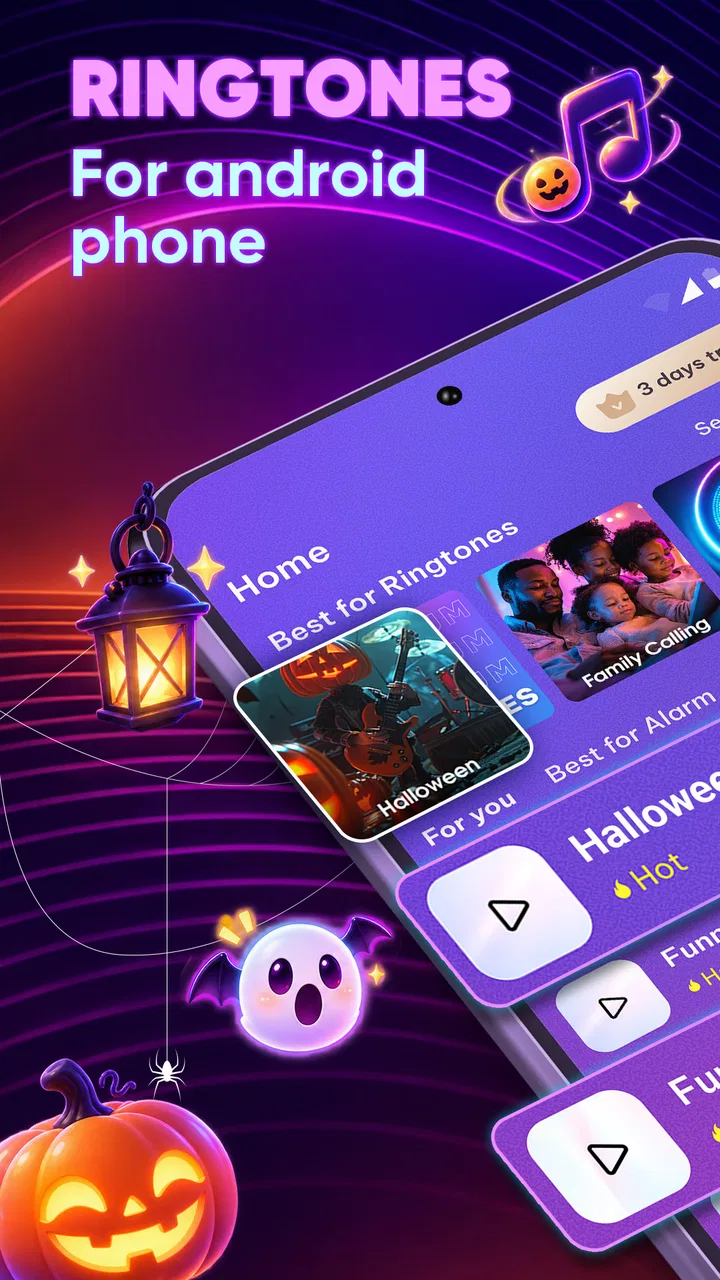
The first thing I noticed is that the app’s usefulness depends on how quickly I can move from opening it to hearing a sound I might actually use. For a ringtone app, that matters more than decorative presentation. I want to recognize the available choices, preview them without confusion, and understand what action comes next. The general layout is most comfortable when I treat it like a catalog rather than an audio workstation.
That approach can be helpful for people who prefer a limited number of clear decisions. Instead of building a tone from a long recording, I can browse options, listen, and decide whether a sound suits a call, message, or alarm. A person who is less comfortable with file managers may also appreciate having the discovery process inside one app rather than searching through folders or downloading separate audio files from unrelated websites.
Readability is especially important here because ringtone titles and controls carry most of the meaning. I found it easier to judge the app when I slowed down and checked each screen before tapping. If you have reduced vision, use a large system font, or rely on strong visual contrast, the experience may depend heavily on your Android display settings and on how the app presents its own controls. I would not assume that every label will remain equally comfortable at every text size, so testing the browsing screens before committing time to a large collection is sensible.
Previewing before choosing is more valuable than a long catalog
A useful habit is to preview a sound in the same context in which you expect to hear it. A tone that seems pleasant through headphones can be too soft, too sharp, or too repetitive when played from a phone across a room. I would listen at a moderate volume first, then consider whether it remains recognizable among ordinary household noise. This is more practical than choosing only by a title or by how dramatic a preview feels.
The app also makes more sense for users who already know what they want: a short alert, a distinctive incoming-call sound, or something less ordinary than the default options. If I am browsing without a purpose, a large selection can turn into a time sink. My advice is to decide in advance whether I am looking for a call tone, a message alert, or an alarm sound, then stop once I find an option that is easy to identify.
For people with cognitive or attention-related needs, that self-imposed limit can make a difference. I would avoid opening the app when I am already distracted and expecting it to organize every choice for me. A short personal list of familiar sounds is easier to manage than constantly changing alerts. The app can support that workflow, but the discipline comes from the user rather than from an elaborate organization system.
What the popularity tells me, and what it does not
The app has a 4.7 average from around 749 thousand ratings, with roughly 15 thousand written reviews. It has also passed 10 million installs, which suggests that the basic idea has reached a broad Android audience. I see those figures as evidence that the app is easy enough for many people to understand, not as proof that it will suit every phone, hearing preference, or accessibility setup.
Its current version is 4.5.0, and it supports Android 7.0 and later. That relatively broad operating-system reach may be useful if you are using an older Android phone rather than a recent flagship. Still, an older supported operating system does not automatically mean that every screen, sound setting, or device-specific behavior will feel identical. Android manufacturers often handle notifications and audio controls differently, so I would judge the final result on the phone where the tone will actually be used.
Motor and sensory considerations during setup
Choosing a ringtone is usually a short interaction, but it can involve repeated tapping, scrolling, previewing, and confirming. That is manageable for most users, yet it may be tiring for someone with limited dexterity, tremor, or difficulty making precise touches. I found that the most efficient approach was to browse slowly, preview only promising options, and avoid repeatedly changing the same setting while comparing similar sounds.
If tapping small controls is difficult, a larger system display setting may help, although it can also cause some app layouts to feel crowded. I would check whether labels remain visible and whether buttons stay separated before relying on the app for an important alert. The best tone in the catalog is not useful if the final selection control is hard to operate or easy to trigger accidentally.
For people with hearing loss, the app should be treated as one part of a broader alert strategy rather than a complete solution. A ringtone can be distinctive, but sound alone may not be enough in a noisy room, while a low-frequency or subtle tone may disappear in background noise. I would pair a chosen sound with the phone’s available vibration or visual notification options where appropriate. The app provides the audio choice; it does not replace the need to configure the device around the user’s hearing.
People with sound sensitivity should take the opposite approach. I would avoid selecting tones with abrupt starts, piercing high notes, or strongly repeating patterns if those qualities are uncomfortable. A preview can reveal a problem before the sound becomes part of daily life. This is one of the less obvious trade-offs of a broad ringtone catalog: variety is useful, but it also means the user has to filter out sounds that may be startling or fatiguing.
There is another sensory issue that is easy to overlook. A tone that is distinctive is not always socially appropriate. A loud or comic sound may help me recognize my own phone instantly, but it can be disruptive in a clinic, classroom, office, or shared home. I would keep a restrained option available for quiet environments and reserve more noticeable sounds for situations where they will not disturb other people.
Situational access: where a custom tone genuinely helps
One realistic example is a shared household where several people use similar phones. If everyone leaves the default ringtone unchanged, it can be difficult to know whose device is ringing. I could choose a clearly different tone for my own calls and a shorter, less intrusive sound for messages. That small change may reduce unnecessary checking, especially when phones are placed on the same table or carried in another room.
Another useful situation is separating contacts by importance. I would not create a complicated collection of special tones, but I might reserve one highly recognizable sound for close family or a time-sensitive contact, while using a quieter general tone for everyone else. The benefit is not entertainment; it is reducing the need to look at the screen every time a sound occurs. This can be helpful when cooking, driving only after safely parking, caring for someone, or working with hands occupied.
For users who do not always notice visual notifications, a strong audio identity can make incoming communication easier to detect. However, I would test the tone at the volume normally used during the day, not only during setup. A sound that works in a silent bedroom may fail in a kitchen, on public transport, or outdoors. Conversely, a tone loud enough for a busy street may be unreasonable in a quiet meeting.
Alarms deserve separate consideration. A ringtone that is pleasant for calls may be a poor wake-up sound because it becomes familiar and easy to ignore. I would choose an alert with a clear beginning and enough variation to attract attention, then check it at the actual alarm volume. Anyone who depends on an alarm for medication, work, or appointments should keep a backup method rather than trusting a newly selected sound without testing it.
When it is better than the usual alternatives
Compared with the built-in Android sound picker, this app is more appealing when I want more variety without manually collecting audio files. The system picker is convenient and predictable, but its selection may feel limited. This app is designed for discovery, so it can be a better fit for someone who wants to browse different styles and quickly find a tone that feels less ordinary.
Compared with downloading individual audio files through a web browser, the app offers a more focused path. Browser-based searching can lead to confusing file names, unsuitable formats, or downloads that are difficult to locate later. A dedicated ringtone app reduces that friction for users who do not want to manage audio folders. The trade-off is that I am accepting the app’s own catalog and workflow instead of having complete control over the source file.
Compared with a full audio editor, this is much easier for a casual user but far less flexible. Someone who wants to cut a precise section of a personal recording, remove silence, normalize volume, or build a tone from a voice memo should choose an editor instead. I would not install this app expecting studio-style control. Its value is convenience, not craftsmanship.
Costs, content, and the barriers that remain
The app is free to download and use, but in-app purchases range from $1.49 to $49.99 per item. That makes it important to pay attention during any purchase flow, especially if the app presents optional extras while I am browsing. A user who only needs one or two recognizable sounds should decide whether the free experience already meets that need before spending money. The upper end of the purchase range is significant enough that I would not treat every paid option as a casual add-on.
The Teen content rating is another reason to use personal judgment when selecting sounds. It does not tell me that every tone will be suitable for every workplace, family setting, or public environment. I would preview anything intended for a child’s phone, a shared device, or a professional context instead of assuming that a general entertainment catalog will always be appropriate.
One remaining barrier is the gap between finding a sound and making it work consistently across Android devices. The app can help me discover a tone, but the phone’s own notification categories, volume modes, do-not-disturb rules, and manufacturer interface may affect when I hear it. If a selected sound does not behave as expected, I would check the Android sound and notification settings before blaming the catalog. This extra step may be frustrating for people who want a single-tap result.
Another limitation is that a ringtone library cannot solve every access need. It cannot make an audio alert visible to someone who cannot hear it, and it cannot guarantee that a quiet sound will be noticed in a noisy environment. Users who need dependable awareness should combine a suitable tone with vibration, flash, wearable alerts, or another device-level option where available. I see the app as a customization layer, not as an accessibility guarantee.
Privacy-conscious users may also prefer a smaller, more controlled approach to customization. I would review the app’s current permission prompts and avoid granting access that does not seem necessary for the task. I am not suggesting a specific permission behavior here; the practical point is to read each request rather than tapping through automatically. People who want the smallest possible software footprint may be happier using the built-in Android picker.
Who should use it, and who should skip it
I would recommend this app to Android users who want a broader selection of ringtone-style sounds, do not want to edit audio manually, and are comfortable checking the final result in their device settings. It is particularly useful when different people in a household need clearly distinguishable alerts or when the default sounds are too easy to miss.
I would be more cautious about recommending it to someone who needs carefully controlled accessibility behavior, exact audio editing, or a completely quiet and distraction-free experience. A person with sound sensitivity may spend more time filtering than enjoying the catalog. Someone who relies on visual or tactile alerts should use it only alongside those options. And anyone who dislikes optional purchases should examine the app’s free path before becoming invested in browsing.
Time Cable has kept the product focused on entertainment rather than turning it into an overloaded customization dashboard. That focus is welcome, but it also means the user must handle the final decisions: which sound is safe and comfortable, how loud it should be, when it should play, and whether it fits the surrounding environment. Those choices are not difficult, yet they are important if the app is being used to improve recognition rather than simply to add novelty.
My inclusive verdict after using it
My overall view is positive, with realistic limits. The strongest reason to try it is the quick path from browsing to a more recognizable personal alert. The large user base and high average rating support the idea that it works well for many ordinary Android users, while the free entry point makes experimenting easy. I especially like it for people who want a practical difference between their phone and everyone else’s without learning audio software.
Its inclusive value comes from choice, not from specialized accessibility features. I can select a sound that is easier for me to distinguish, avoid tones that are harsh or distracting, and adapt the result to different places. That flexibility is useful, but it requires previewing carefully and combining the tone with the phone’s own vibration and visual settings when sound is not enough.
Before installing, I would ask myself three questions: Do I need more variety than the built-in sounds provide? Am I willing to test the result on my own device and in real surroundings? Will I be comfortable navigating optional purchases and filtering the catalog? If the answers are yes, this entertainment app is a sensible, accessible starting point for personal ringtone customization. If I need precise editing, guaranteed multi-sensory alerts, or a completely controlled experience, the built-in Android tools or a dedicated audio editor may be the better choice.
FAQs for Ringtones for android phones
01What are the main features of the Ringtones app for Android?
The Ringtones app offers a vast library of tones across various genres, including pop, classical, and seasonal themes. Users can easily browse, preview, and download ringtones, as well as set custom tones for calls, notifications, and alarms. The app also provides options to create personalized ringtones using built-in editing tools.
02Is the Ringtones app free to use, and are there any in-app purchases?
The app is free to download and offers a wide selection of ringtones at no cost. However, it does include optional in-app purchases for premium features, such as ad removal, exclusive ringtones, and advanced editing tools. Users can enjoy the core functionalities without spending money, but the additional features enhance the experience.
03How user-friendly is the Ringtones app for beginners?
The Ringtones app is designed with simplicity in mind, making it user-friendly for beginners. It features an intuitive interface with easy navigation and clear instructions. The search function allows users to quickly find and preview tones, while setting ringtones is straightforward with step-by-step guidance provided within the app.
04Does the app require an internet connection to function?
The Ringtones app requires an internet connection to browse and download new ringtones. However, once a ringtone is downloaded, it can be used offline. Users can access previously downloaded tones without needing to be connected, which is convenient for those with limited internet access.
05Can I use the Ringtones app to create custom tones from my music library?
Yes, the Ringtones app includes a feature to create custom ringtones from your music library. Users can select a song, choose the desired segment, and edit it using the app's built-in tools. This allows for a personalized touch, enabling you to set unique tones that reflect your musical preferences.
Pros
- Wide variety of ringtones available.
- Easy to navigate user interface.
- Option to set ringtones for contacts.
- Regular updates with new sounds.
- Offline access to downloaded ringtones.
Cons
- Contains frequent ads interrupting use.
- Limited free content without purchase.
- Some ringtones lack originality.
- Requires in-app purchases for premium.
- Occasional app crashes on older devices.

Ringtones for android phones
Gallery